
Multi-account
All your MT5 and crypto accounts in one place
Connect your prop challenge, funded, personal and exchange accounts, and run strategies on all of them — each with its own limits. A bad day on one account stays on that account.
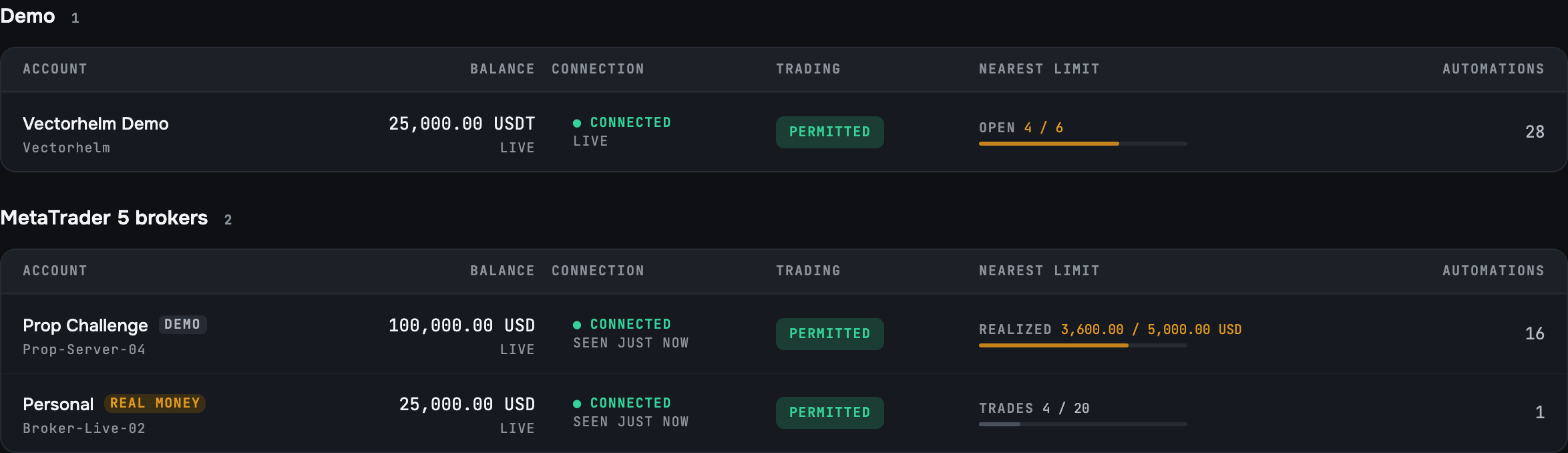
Accounts you can connect
| Account | How it connects |
|---|---|
| MT5, any broker | A small connector EA in your own MT5 terminal |
| Binance, Bybit, OKX | Trading-only API keys |
| Vectorhelm demo account | Built in, no broker needed |
One strategy, many accounts
- Launch a saved strategy on any of your accounts.
- Each account trades on its own: its own positions, limits and results.
- One TradingView alert can drive several accounts at once.
Run the same logic on a challenge account and a personal account, with tighter limits on the challenge.

A bad day on one account stays on one account
Separate limits
Each account has its own limits.
Stays on one account
An account limit stops only the strategies on that account.
One-click disconnect
One click disconnects an account, and it stops trading at once.
Your whole account, including manual trades
Manual trades included
Vectorhelm tracks every trade on a connected account, including the ones you place by hand. Close a strategy’s position yourself and it stays in that strategy’s history, marked as a manual close. Your stats always match your real account.
Stopped strategies are archived
Stopped strategies move to an archive with their full history, so your list stays short and nothing is lost.
Your money stays yours
Your funds stay put
Your funds stay at your broker or exchange. Vectorhelm never holds or moves money.
Trading-only keys
Exchange API keys only need trading permission. We never ask for withdrawal permission.
Frequently asked questions
Connecting accounts, running one strategy on several, and what stays separate.
Does my MT5 terminal need to stay open?
Yes. The connector EA runs inside your MT5 terminal, so the terminal must be running and connected. Many traders use a VPS for this — and MT5 hosting by Vectorhelm is coming soon, so you won’t need your own.
Which brokers and exchanges are supported?
Any MT5 broker — there’s no fixed list — plus Binance, Bybit and OKX.
Can Vectorhelm withdraw from my exchange account?
No. Exchange keys only need trading permission, and we never ask for withdrawal permission.
Can I connect several prop firm accounts?
Yes, each with its own limits set to match that firm’s rules. Check each firm’s rules on automated trading before you connect.
What happens if I trade by hand on a connected account?
Vectorhelm records it. If you close a strategy’s position yourself, it stays in that strategy’s history, marked as a manual close.
What happens to a strategy I’ve stopped?
It moves to the archive with its full history kept.
Run all your accounts from one place.
Join the waitlist for free early access. Connect your prop, personal and exchange accounts, each with its own limits.