
For TradingView users
Auto-trade your TradingView alerts
on crypto and MT5
Your strategy already lives on TradingView. Vectorhelm turns each alert into a real order on your exchange or MT5 account — sized by your strategy and checked against your limits.
- One webhook
- from alert to live order
- Crypto + MT5
- one alert can trade several accounts at once
How an alert becomes a trade.
Add the webhook
Paste your Vectorhelm webhook and message into the alert. The alert only says open or close.
Once
Your strategy sizes it
Position size, execution mode, stop-loss and take-profit come from your strategy settings. Change them without touching your Pine Script.
Strategy settings
Your limits check it
Daily loss, drawdown, open positions and trades per day — checked before the order is sent.
Before sending
One alert, any account
The same alert can drive an MT5 account or a crypto exchange — or several accounts at once, each with its own limits.
Any account
Know what your alert actually sends.
Most alert problems come from the message and the timing, not the strategy.
A message ready to paste
Vectorhelm gives you the alert message as structured data, not a sentence. TradingView fills in placeholders like {{ticker}} and {{strategy.order.action}} before it sends.
Message
Once per bar, by default
A standard strategy alert fires when the bar closes, not on every tick. That’s usually what you want — and why an alert can feel late next to a live chart.
Bar close
The same alert can arrive twice
TradingView sometimes sends the same alert twice. Vectorhelm recognises the repeat, so it never opens a second position.
No duplicates
Alert quotas are per plan
Each TradingView plan limits how many alerts you can keep active. One alert trading several accounts beats one alert per account.
Per plan
What Vectorhelm adds after the alert.
Your alert knows what your indicator says. It doesn’t know the right size for your account, whether you’ve already lost too much today, or what your broker calls the symbol.
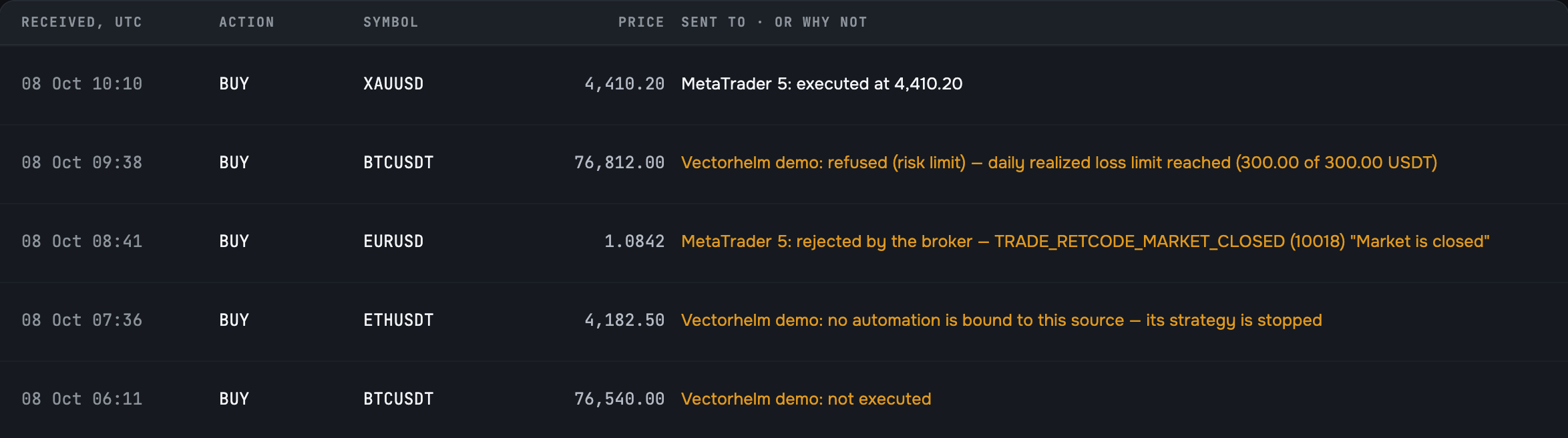
Vectorhelm fills those gaps. The same coin can be BTCUSDT on one exchange and BTCUSD at a broker, so you match each chart symbol to the one on your account, once. An alert with an unmatched symbol is refused with a clear reason — never guessed.
- Size worked out for the account it trades on
- Limits checked the moment the alert arrives
- Symbols matched once per strategy, so every alert trades the right instrument
Put your TradingView alerts to work.
Join the waitlist for free early access. Send an alert you already use to a demo account and watch it become a trade.