
Signal execution
Auto-trade your TradingView alerts on MT5 and crypto
Your alert says when to open or close. Vectorhelm handles the rest — position size, stop-loss, take-profit and how the trade is managed — and checks every order against your limits first.
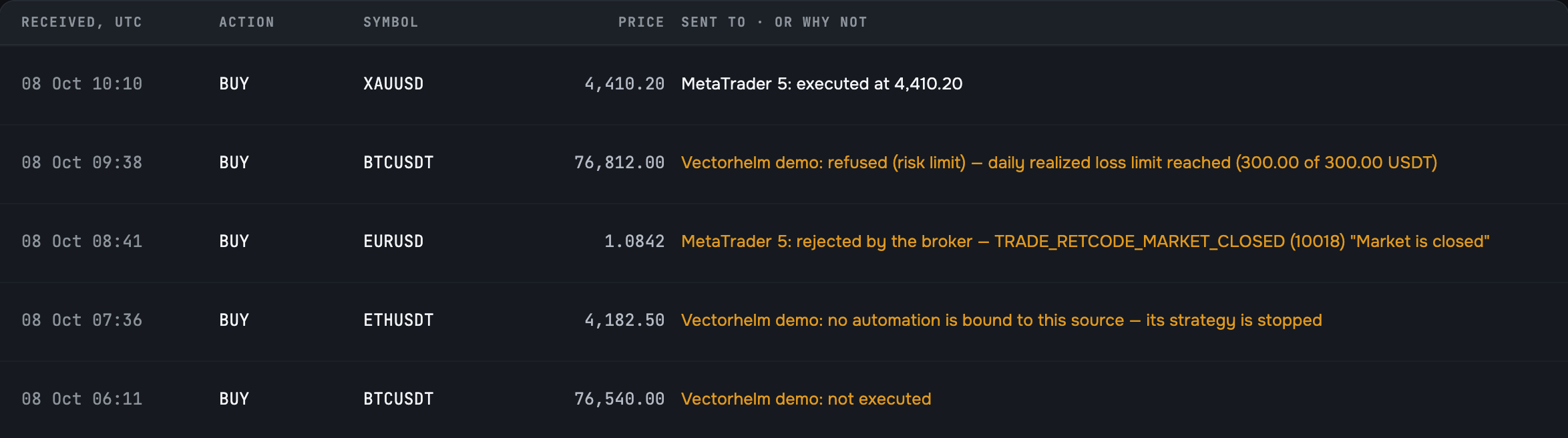
See what happened to every alert
No more guessing whether an alert fired. Your signal history shows the result of each one.
| Outcome | What it means |
|---|---|
| Executed | The order reached your account |
| Blocked by your limit | One of your limits stopped it — you see which one |
| Rejected by the broker | Your broker declined it, and you see the broker’s reason |
| No running strategy | The alert arrived, but no running strategy uses it |
| Not executed | The alert arrived, but no order was placed |
What happens when your alert fires
It’s received and logged
Every alert gets an ID, so you can trace it later.
It goes to your strategy
Each alert is linked to one strategy.
Your strategy decides what to do
Open one position or start a Martingale ladder, depending on its execution mode.
Your limits check it
Alerts get the same risk checks as everything else. No exceptions.
The order goes to your account
Or it doesn’t — and you see why.
Late or repeated alerts can’t hurt you
Late entries are skipped
If an entry alert arrives later than the window you set (10 seconds to 5 minutes), it’s ignored. A late entry at a worse price is worse than none.
Exits always go through
A close alert executes however late it arrives. Getting out is never blocked.
No double trades
If TradingView sends the same alert twice, it’s executed only once.
Where your signals can come from
TradingView alerts
Vectorhelm writes the alert message for you. Copy it, paste it into your TradingView alert, done.
Webhooks
Any bot, script or tool that can send a webhook can trigger your strategy.
Telegram
Signals from Telegram channels, or your own through the Vectorhelm Telegram bot.
Strategy builder
Signals from your own indicator rules, built without code in the strategy builder.
Where your trades go
- MT5 accounts, with any broker
- Binance, Bybit and OKX
- Your Vectorhelm demo account
One TradingView alert can drive several accounts at once.

Frequently asked questions
Getting your alerts from TradingView to your account.
Do I need a paid TradingView plan?
Yes. TradingView only sends webhook alerts on its paid plans, and it requires two-factor authentication on your TradingView account.
Does my alert decide the position size?
No. The signal only says open or close. Size, stop loss, take profit and how the position is managed come from the strategy it feeds.
What happens if a signal arrives late?
An opening signal older than your window — you choose between 10 seconds and 5 minutes — is skipped. A close signal always executes.
What if TradingView sends the same alert twice?
Vectorhelm recognises the retry and executes it once.
Can one alert trade several accounts?
Yes. One TradingView alert can drive several accounts at once, each with its own limits.
Can I send signals from my own script or from Telegram?
Yes. Any script or tool that can send a webhook can trigger a strategy, and so can Telegram channels and your Vectorhelm Telegram bot.
Put your TradingView alerts on autopilot.
Join the waitlist for free early access. Send your first alert to a demo account, or straight to your exchange or MT5.
Your funds stay at your broker or exchange. Vectorhelm never holds or moves them.